Omniflex has recently launched a new set of Maxiflex CPUs - the T1 and now the T2. These CPUs are intended for data acquisition and telemetry applications. They require no user programs when used for data acquisition or telemetry application and are designed to be just plugged straight in, field wiring connected, and power switched on. All I/O is scanned automatically and I/O status assembled into a data interchange table (DIT).
For digital inputs and standard analogs the input status requires no configuration at all, however, temperature inputs like thermocouple and RTD require the sensor type to be configured providing input values in engineering units of °C or °F. Scaled analog inputs can also be catered for - eliminating the need for the HMI to do any scaling to engineering units for 4-20 mA loops from the field. Adding I/O to the system has been made simple - by just plugging in the new modules while the system is live (hot plug-in) and then plugging in the detachable wire terminals from the field. The new field I/O status is added to the DIT automatically.
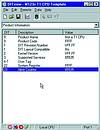
Configuration is easily performed with the free Windows-based software package called OmniSet (Figure 1) and a serial cable available from Omniflex. Simple selection of pull down options allows the user to configure the CPU completely. This configuration includes the ability to create multi-drop telemetry systems using the Omniflex CONET local area network up to 10 km on twisted pair cable. Configuration can also be done via the HMI, if so desired, making a neatly integrated system controlled exclusively from the HMI stations.
Figure 1
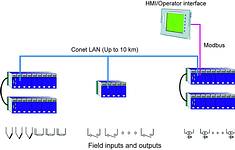
The HMI is connected to the Maxiflex T1 or T2 CPU via its auxiliary serial port - which can be set to communicate using Modbus Protocol, one of the standard protocols on every HMI. The HMI then has access to any of the DIT registers on the CPU. In fact, if a Conet local area network is used, any data from the network is also accessible to the HMI - not just the local node. Multiple HMIs can also be connected to the network in the same fashion, reading the same or different data from the network. Outputs may also be generated from the HMI to activate plant devices.
Windows-based Utility OmniSet for configuration Maxiflex provides a cost effective solution to HMI front ends and simplifies the field I/O systems by eliminating the need to write time-consuming application programs for data acquisition or telemetry. Maxiflex I/O systems cover analog inputs, voltage, current, thermocouple, RTD and digital inputs, potential free and voltages up to 200 V d.c. series contact chains and pulse inputs up to 50 kHz.
Interfacing to third party RS232 or RS485 devices is a speciality with analytical devices like gas chromatographs, gas analysers, intelligent circuit breakers or substation energy metering equipment, etc. Given the communication protocol, Maxiflex will communicate with any of these devices. Figure 2 shows the Maxiflex I/O system for HMI display.
Unlocking ICCP remote monitoring Omniflex Remote Monitoring Specialists
Maintenance, Test & Measurement, Calibration
Cathodic protection keeps buried and submerged pipelines safe from corrosion, but verifying it traditionally means costly, hazardous manual site visits. Omniflex explains how a retrofit module brings remote monitoring to ageing transformer rectifiers without replacing functional infrastructure.
Read more...Mine-wide water monitoring at Nkomati Nickel plant Omniflex Remote Monitoring Specialists
Data Acquisition & Telemetry
Omniflex is supplying a new wireless telemetry system for Nkomati Nickel plant, restoring mine-wide monitoring of water and pumping systems across six outstations as the operation prepares to resume following a R753 million restart investment.
Read more...Omniflex delivers ICCP systems in London Omniflex Remote Monitoring Specialists
Maintenance, Test & Measurement, Calibration
Omniflex has supplied impressed current cathodic protection systems for landmark London buildings, protecting reinforced concrete from corrosion and extending the service life of commercial, retail and heritage sites.
Read more...Modernising acid cooler protection without disrupting production Omniflex Remote Monitoring Specialists
Maintenance, Test & Measurement, Calibration
Omniflex has supplied an advanced anodic protection control system to phosphate producer Foskor, replacing a legacy transformer rectifier system while maintaining uninterrupted production. The distributed PowerView CP solution provides remote monitoring and DCS integration.
Read more...Upgrading alarm systems for critical industries Omniflex Remote Monitoring Specialists
PLCs, DCSs & Controllers
Omniflex’s OMNI16R alarm annunciator platform provides a direct replacement for legacy CSA systems such as MPAS 90 and SA9100, enabling operators in oil and gas, nuclear and power generation to modernise alarm infrastructure without sacrificing the clarity required for safe operations.
Read more...Rethinking corrosion protection in process plants Omniflex Remote Monitoring Specialists
Maintenance, Test & Measurement, Calibration
Remote monitoring is changing how cathodic and anodic protection systems are managed in process plants, giving operators continuous visibility of corrosion protection performance and enabling more proactive maintenance decisions.
Read more...Rethinking corrosion protection in process plants Omniflex Remote Monitoring Specialists
Maintenance, Test & Measurement, Calibration
Omniflex explains how integrating remote monitoring and cloud-based platforms into cathodic and anodic protection systems is helping process plant operators stay ahead of corrosion and make smarter maintenance decisions.
Read more...Preserving a French heritage landmark Omniflex Remote Monitoring Specialists
Maintenance, Test & Measurement, Calibration
Omniflex supplied a remotely monitored impressed current cathodic protection system for the Perret Tower in Grenoble, a protected French heritage site, combining 24/7 corrosion protection with integrated surge protection against lightning strikes.
Read more...Lessons in long-distance telemetry Omniflex Remote Monitoring Specialists
Industrial Wireless Data Acquisition & Telemetry
Key engineering lessons from decades of deploying wireless telemetry systems in demanding industrial applications, covering network management, power constraints, physical challenges and the value of open, simplified architectures.
Read more...Long-distance signal delivery is critical to rail safety Omniflex Remote Monitoring Specialists
Fieldbus & Industrial Networking
A remote monitoring specialist explains why fibre optic technology is increasingly replacing copper cabling in safety-critical railway signalling systems.
While every effort has been made to ensure the accuracy of the information contained herein, the publisher and its agents cannot be held responsible for any errors contained, or any loss incurred as a result. Articles published do not necessarily reflect the views of the publishers. The editor reserves the right to alter or cut copy. Articles submitted are deemed to have been cleared for publication. Advertisements and company contact details are published as provided by the advertiser. Technews Publishing (Pty) Ltd cannot be held responsible for the accuracy or veracity of supplied material.









 printer friendly version