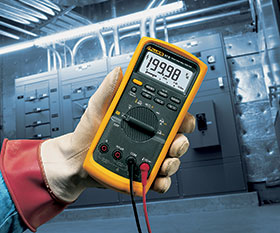
Digital multimeters are designed to assist users to carry out test and measurement functions from simple to highly complex, on the bench or remotely in the field. From time to time, users should test meters and other equipment in the field. By paying attention to the following quick steps, they can help ensure the safety and efficiency of the meter.
• Use common sense: before beginning, take a closer look at the equipment and accessories: does it look shabby and badly worn? If so, perhaps the unit is beyond functional and should not be used.
• Inspect leads: before using test leads, perform an inspection to ensure the leads can safely and accurately conduct electricity for the job at hand. Be sure the leads have shrouded connectors, finger guards, CAT ratings that equal or exceed those of the meter, double insulation and minimum exposed metal on the probe tips.
• Continuity testing: use the meter’s own continuity testing function to check for internal breaks. Check test lead resistance by inserting leads in V/Ω and COM inputs, and selecting Ω, touching probe tips and being sure the leads are 0,1 – 0.3 Ω
• Choose accessories that are suitable for industrial work, and check for abrasions and other damage that eventually occur with use: this way, users will never have to worry about the failure of a test lead or probe or the consequences thereof.
• Inspect test lead insulation: check and ensure that the insulation is not nicked or cracked. With age the insulation material, whether PVC or silicone, can become dried out, brittle and susceptible to cracking. A visual inspection will often show any part of the leads that has this problem. Ensure that there are no signs of gaps or cracks at the junction between the insulated wire and the moulded banana plugs or probes at each end.
• Verify correct voltage rating: verify that the meter and accessories are appropriately rated and designed for the system and equipment to which they will be connected. Check for the IEC rating (e.g. CAT III or CAT IV) on the tester, and only purchase leads and other accessories that meet or exceed that rating.
Safety checking equipment in the field can reduce hazards and ensure that equipment is safely functional. Whether the equipment is a voltage tester or a digital multimeter, users can benefit greatly by carrying out a quick safety scan before commencing work.
Infrared thermometers for electrical, industrial and HVAC applications Comtest
Maintenance, Test & Measurement, Calibration
: Comtest, distributor of Fluke test and measurement equipment, explains how handheld infrared thermometers are transforming maintenance in electrical, industrial and HVAC environments, with three measurement strategies and a wide range of practical applications.
Read more...Outdoor cellular routers for potentially explosive areas Phoenix Contact
IS & Ex
Phoenix Contact has extended its Cellulink outdoor cellular router range with new versions approved for Zone 2 potentially explosive areas, featuring end-to-end IECEx and ATEX certification of the complete router, antenna path and antenna system.
Read more...Nine things your emergency control room must now have Oculus Operational Innovations
Editor's Choice IS & Ex
A new South African regulation, effective since March 2025 with no transition period, sets out nine mandatory requirements for underground mine emergency control rooms, and specifies who must be in charge at all times.
Read more...Cybersecurity for potentially explosive areas Phoenix Contact
IS & Ex
The Cellulink outdoor cellular router product range from Phoenix Contact is being extended. New versions are now also available that have been specially developed for use in Zone 2 potentially explosive areas.
Read more...Windows tablets for hazardous areas Extech Safety Systems
IS & Ex
i.safe Mobile has expanded its intrinsically safe product range with the launch of the IS945.x series rugged Windows tablets, designed for use in hazardous and demanding industrial environments.
Read more...Hazardous area inspections Extech Safety Systems
IS & Ex
The i.safe MOBILE IS940.1 tablet from Extech delivers the performance of a modern Android device, but in a package designed from the ground up for hazardous areas.
Read more...Unified endpoint management in hazardous industrial environments Extech Safety Systems
IS & Ex
The strategic integration of SafeUEM‘s comprehensive end-point management platform with i.safe MOBILE‘s certified intrinsically safe devices delivers a unified solution specifically engineered to address the challenges of managing technology in hazardous industrial settings.
Read more...A lesson in the history and evolution of industrial safety systems Schneider Electric South Africa
IS & Ex
One only has to briefly page through the annals of our industrial history to come across truly hair-raising stories of safety systems failing or underperforming with catastrophic repercussions. Fortunately, industrial safety in the last few decades has undergone some truly profound development.
While every effort has been made to ensure the accuracy of the information contained herein, the publisher and its agents cannot be held responsible for any errors contained, or any loss incurred as a result. Articles published do not necessarily reflect the views of the publishers. The editor reserves the right to alter or cut copy. Articles submitted are deemed to have been cleared for publication. Advertisements and company contact details are published as provided by the advertiser. Technews Publishing (Pty) Ltd cannot be held responsible for the accuracy or veracity of supplied material.










 printer friendly version